 orbitly-revenue.png
Spotlight
Dim, blur or desaturate everything except the regions you choose: rectangles, rounded shapes, ellipses, freehand or polygons, with a soft feather and a glowing edge.
Free Chrome extension · No account · Nothing uploaded
InnoShot captures the whole page, a precise selection or a single element, then opens it in a real editor: annotations, a spotlight on what matters, glass effects, gradient backgrounds and browser frames. Export a crisp PNG, JPEG, WebP, SVG or a paginated PDF. Everything happens in your browser.
For Google Chrome on desktop · No account · Works offline · Coming to the Chrome Web Store
Four ways to capture, each one click, one shortcut or one right-click away. Shortcuts are suggestions you can change at chrome://extensions/shortcuts.
What is on screen right now, at full resolution. Alt+Shift+V.
The whole page, scrolled and stitched for you, with sticky headers shown once. Alt+Shift+F.
Drag a region, nudge it to the pixel, lock an aspect ratio. It can run past the bottom of the screen. Alt+Shift+S.
Point at a card, chart or table and capture just that, even when it is taller than the window. Alt+Shift+E.
Drag the handle, or focus it and use the arrow keys, to compare a plain capture with the same screenshot after editing in InnoShot: a background, rounded corners and a shadow, a spotlight on the number that matters, an arrow with a label, and the customer emails permanently redacted.
Illustration with a sample dashboard. The emails on the right are covered by permanent redaction.
Everything outside the chart is dimmed, and the chart gets a glowing amber edge. Regions can be rectangles, rounded, ellipses, freehand or polygons, and you can add several.
More about spotlightThe same capture on a soft gradient with padding, rounded corners and a shadow. Choose solid, linear, radial or mesh gradients, patterns, noise or your own image, and an aspect preset for where it is going.
More about backgroundA drawn browser window with the page address, in light or dark. Chrome-style, macOS-inspired, Windows-inspired and minimal styles, plus desktop, laptop, tablet and phone frames.
More about browser frameA frosted glass panel blurs and tints the real pixels underneath, so a note sits on top of the chart and stays readable while the data still shows through.
More about glassA screenshot of InnoShot itself: the same spotlight, arrow and label, with the layers that make them up.
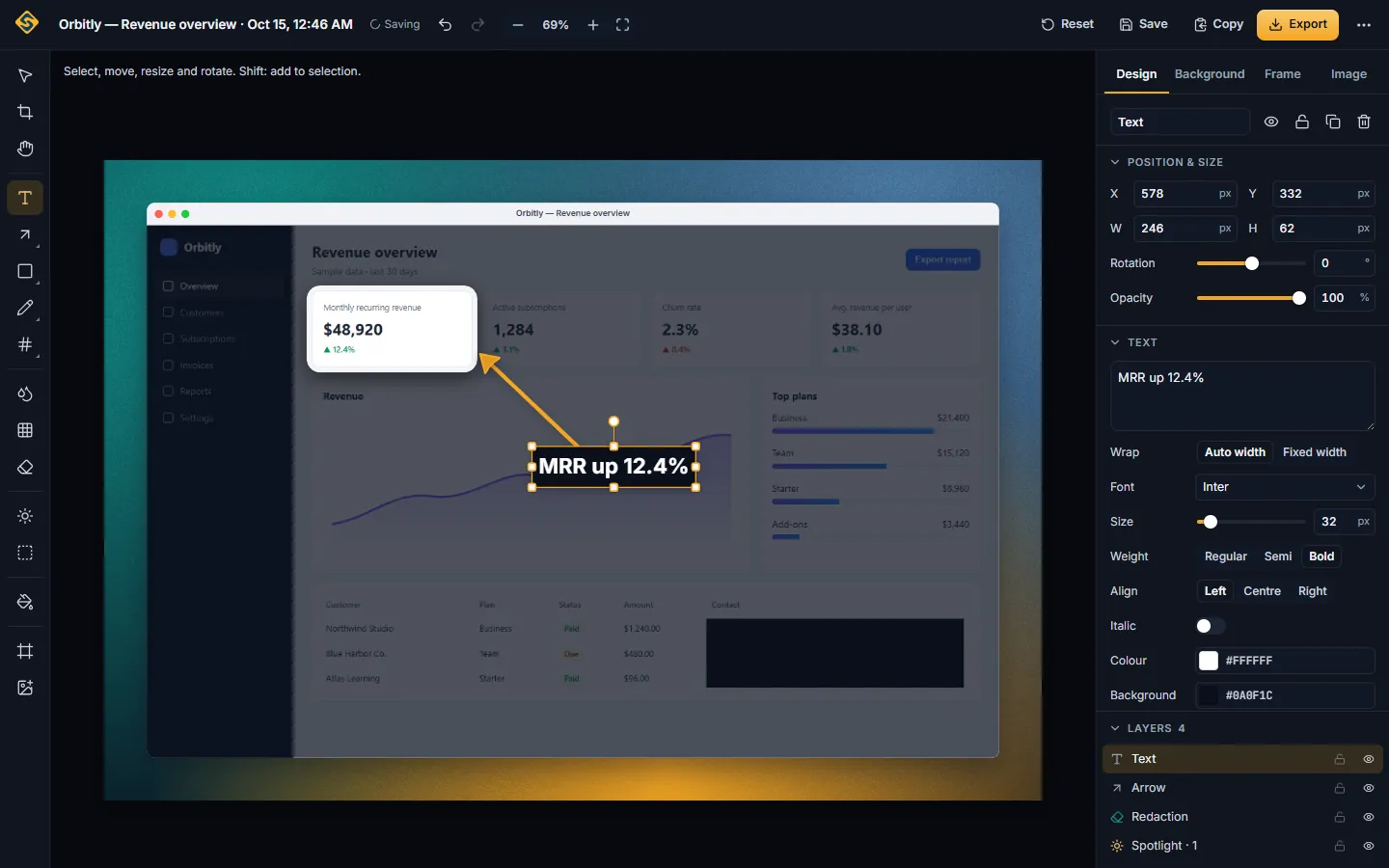
One flow from the page you are looking at to the file you share. No uploads, no sign-in, no waiting for a server.
Click the InnoShot icon, press a shortcut or right-click the page, and choose visible area, full page, selected area or element. A delayed capture catches menus and tooltips.
The capture opens in the InnoShot editor in its own tab. Crop without losing pixels, straighten, adjust, and annotate with arrows, shapes, text, numbered markers, callouts and a magnifier.
Spotlight the part that matters, lay a glass panel over the real pixels, and place the shot on a gradient, mesh or image background with padding, rounded corners, a shadow and a browser frame.
Save PNG, JPEG, WebP, SVG or a PDF that splits tall captures into readable pages, or copy to the clipboard. Redactions are flattened into every export.
Every effect is a layer you can move, restyle, hide or remove later. Nothing is baked in until you export.
Dim, blur or desaturate everything except the regions you choose: rectangles, rounded shapes, ellipses, freehand or polygons, with a soft feather and a glowing edge.
Frosted panels that blur and tint the real pixels underneath, with borders, reflections and inner highlights, for labels that stay readable.
Solid, linear, radial and mesh gradients, soft blur, patterns, noise or your own image, with padding, aspect presets, corner radius and shadow.
Chrome-style, macOS-inspired, Windows-inspired or minimal frames in light or dark, with the page address, plus drawn desktop, laptop, tablet and phone frames.
Arrows and curved arrows, shapes, highlighter, text, numbered markers, callouts, speech bubbles and a magnifier, all restyleable.
Blur and pixelate for looks, permanent redaction for secrets: an opaque box flattened into every exported file.
InnoShot is a browser extension with no server behind it. Captures, edits, history and exports are made and kept in your own browser.
The extension makes no network requests. There is no InnoShot cloud to send a screenshot to.
Install it and use it. No sign-up, no email address, no license key.
InnoShot asks for no host permissions. It can only see a tab after you click its icon, press its shortcut or use its menu on that page. Details about no access to all your sites
Once installed, capturing, editing and exporting work without an internet connection.
Redacted areas are opaque and flattened into every PNG, JPEG, WebP and PDF you export. Blur and pixelate are clearly labeled as cosmetic. Details about redaction that stays redacted
{
  "permissions": [
    "activeTab",        // the tab you click on, when you click
    "scripting",        // the capture helper, injected on demand
    "storage",          // your settings
    "unlimitedStorage", // your captures, in your browser
    "contextMenus"      // the right-click menu
  ]
  // no "host_permissions": no access to all your sites
}Pick a format, a scale and a quality, see the estimated file size, and save. Or copy straight to the clipboard and paste it into a chat or a document.
InnoShot is free, needs no account and keeps everything on your computer. It is built for desktop Google Chrome 116 or newer on Windows, macOS, Linux and ChromeOS.
InnoShot is coming to the Chrome Web Store. The download page will link to the official listing as soon as it is live.
| Browser | Status |
|---|---|
| Google Chrome 116 or newer (desktop) Windows, macOS, Linux and ChromeOS. Tested on Windows 11; macOS, Linux and ChromeOS are expected to work but not yet manually verified. | Supported |
| Microsoft Edge Can install Chrome Web Store extensions and may work, but is not tested or supported in InnoShot 1.0.0. | Not supported in 1.0.0 |
| Brave Can install Chrome Web Store extensions and may work, but is not tested or supported in InnoShot 1.0.0. | Not supported in 1.0.0 |
| Firefox and Safari Not available. InnoShot is a Chrome (Manifest V3) extension. | Not available |
| Chrome on Android and iOS Chrome on Android and iOS does not run extensions. | Not available |
Something else? The full FAQ and the documentation go further.
Yes. InnoShot is free to install and use, with no account and no watermark on your exports.
InnoShot is built for desktop Google Chrome 116 or newer on Windows, macOS, Linux and ChromeOS. It is tested on Windows 11; the other systems are expected to work but are not yet manually verified. Microsoft Edge, Brave and other Chromium browsers can install Chrome Web Store extensions and may work, but they are not tested or supported in InnoShot 1.0.0. It does not run in Firefox, Safari or on phones.
No. Captures are made, edited, stored and exported inside your browser. The extension has no server and makes no network requests, so there is nowhere for your images to go unless you send them yourself.
No. Blur and pixelate are cosmetic: researchers have recovered text from blurred and pixelated images. For anything that must not be readable, use Redact, which draws an opaque box that is flattened into every exported image and PDF.
Yes. Full-page capture scrolls the page and stitches the screenshots into one image, showing sticky headers once and loading lazy images first. Chrome allows two captures per second, so long pages take a few seconds; you can watch the progress and press Esc to cancel.
PNG, JPEG and WebP with quality and scale controls, SVG with vector annotations, and PDF. You can also copy the finished image to the clipboard.